Nzyme v2.0.0-alpha.20 has been released
We are getting close to the first beta release of Nzyme v2.0.0. This update closes the loop in the Ethernet subsystem, brings a full REST API and a lot of improvements across the board. Additionally, we have fixed two security vulnerabilities with medium severity.
Changelog
- Security: Fixes for two vulnerabilities with medium severity
- New Feature: Portal Integrity Monitoring
- New Feature: STUN/TURN Support
- New Feature: WebRTC Support
- New Feature: RTSP Support
- New Feature: API Keys and REST API Documentation
- New Feature: Network Context
- New Feature: IP Address Details Page
- New Feature: Tap
topProcess Monitor innzyme-util - New Feature: Web Interface Narrow Screen Mode
- Improvement: Bluetooth Filters, Sorting, Context, Charts and Monitors
- Improvement: Tenant and Tap Selector
- Improvement: Additional Asset Filters
- Improvement: Time Range Chart Behavior
- Improvement: Charts for SSH and SOCKS Pages
- Improvement: Detection of Source/Destination Traffic Direction for TCP and UDP
- Improvement: Significant Performance Improvements for
nzyme-tapandnzyme-node - Many Small Bug Fixes and Improvements Across the Entire System
Security Fixes
This release fixes two security vulnerabilities with medium severity. We recommend upgrading all nodes and taps.
The first issue affected the REST API endpoints that update configuration settings. These endpoints did not strictly limit the configuration keys they accepted. An authenticated user with permission to change one area of the configuration could submit additional keys outside of that area. All configuration update endpoints now validate every submitted key against an explicit list of expected keys and reject the entire request if an unknown key is included.
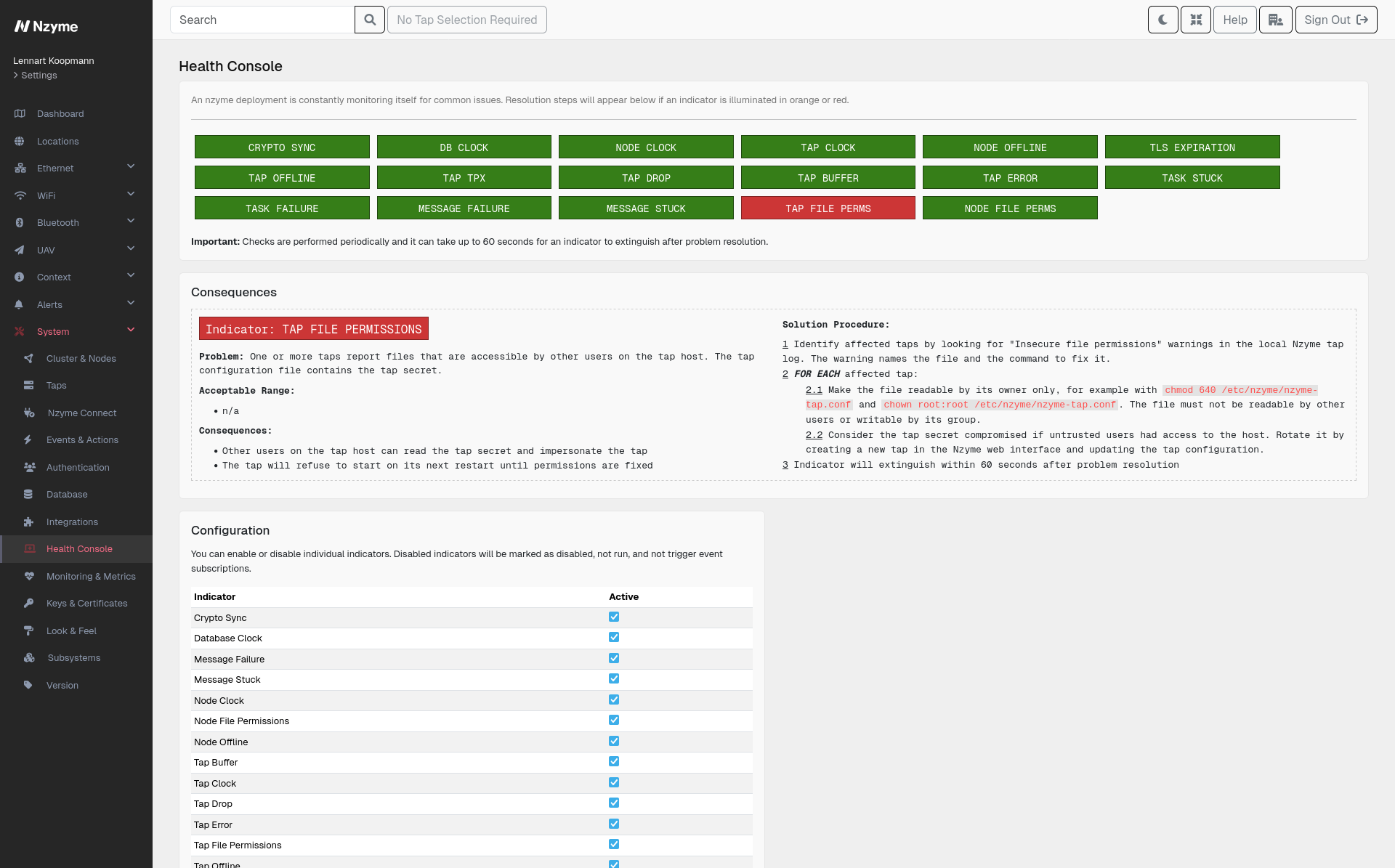
The second issue concerns file permissions. The Nzyme packages created the directory holding the cluster PGP private
key with permissions that allowed other users on the same host to read it. The packages now create this directory as
owner-only. On top of fixing the packaging, both nzyme-node and nzyme-tap now check the permissions of all files
that hold secrets on startup and regularly during operation. This includes the node configuration file with the
database password, the PGP private key, TLS private keys and the tap configuration file with the tap secret. A new
health indicator in the web interface reports files that are accessible by other users, together with the commands
to fix them. Nodes and taps will refuse to start if permissions are too open.
Shoutout to kta1kri on GitHub for discovering and reporting these vulnerabilities.
The security advisories are available on GitHub and we have requested CVEs:
- Tenant users can write arbitrary tenant-scoped configuration through the SSID monitoring configuration endpoint
- Nzyme node writes the cluster PGP private key with world-readable permissions
General Progress Update on the Ethernet Subsystem
This release is a giant step forward for threat hunting, incident response and analysis in the Ethernet subsystem. We do not cover all the protocols we are aiming for yet, but the ones we do support are now complete, with filtering, sorting, charts, details pages and context across the board.
The next release will focus on the remaining protocols, like VPNs and RDP, and will add detection and alerting on top of the data the subsystem collects. Now is a good time to set up the Ethernet subsystem, so that you already have data and configuration in place when those features arrive.
New Feature: Portal Integrity Monitoring
This is the first feature of the Ethernet subsystem that actively interacts with a network instead of only listening to it.
In July 2026, Microsoft Threat Intelligence published details about a campaign named CaptiveCrunch, in which an actor attributed to the Russian SVR manipulated the captive portals of hotels, conference centers and other hospitality venues. Guests who connected to the WiFi were not shown the usual sign-in page, but lookalike Microsoft sign-in pages, device code phishing prompts and fake update screens that delivered malware. The network and SSID was real, but there was no rogue access point to detect. The only thing that had changed was what the portal did. Classic WiFi and network monitoring cannot see this because the traffic looks perfectly normal.
Portal integrity checks let Nzyme continuously experience a network the way a freshly connected guest device would. A
probe on nzyme-tap joins the network with its own MAC address and its own independent network stack, requests a
DHCP lease, calls the same connectivity check URLs that operating systems use to detect captive portals, follows every
redirect and records what it is presented with. The probe never signs in or accepts any terms, so the gateway treats
it as a new guest in every cycle and you get a continuous record of what a guest sees.
Each check is stored as a report in Nzyme. You can review the DHCP lease, every redirect hop with its resolved IP address and GeoIP information, the presented TLS certificates and the full content of the portal page. Comparing reports over time lets you spot rogue DHCP servers, hijacked DNS, inserted redirect hops, moved portal pages and injected content.
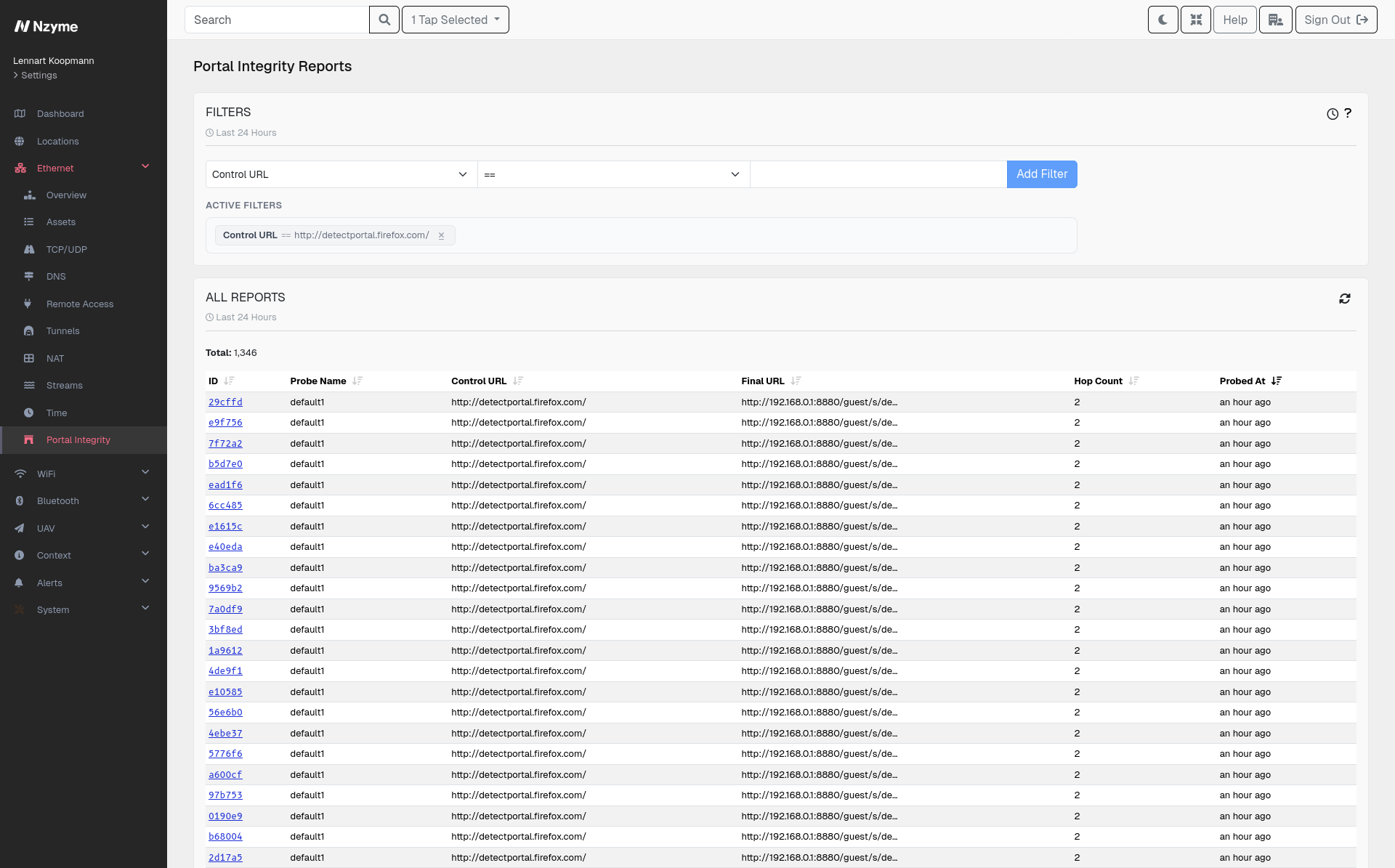
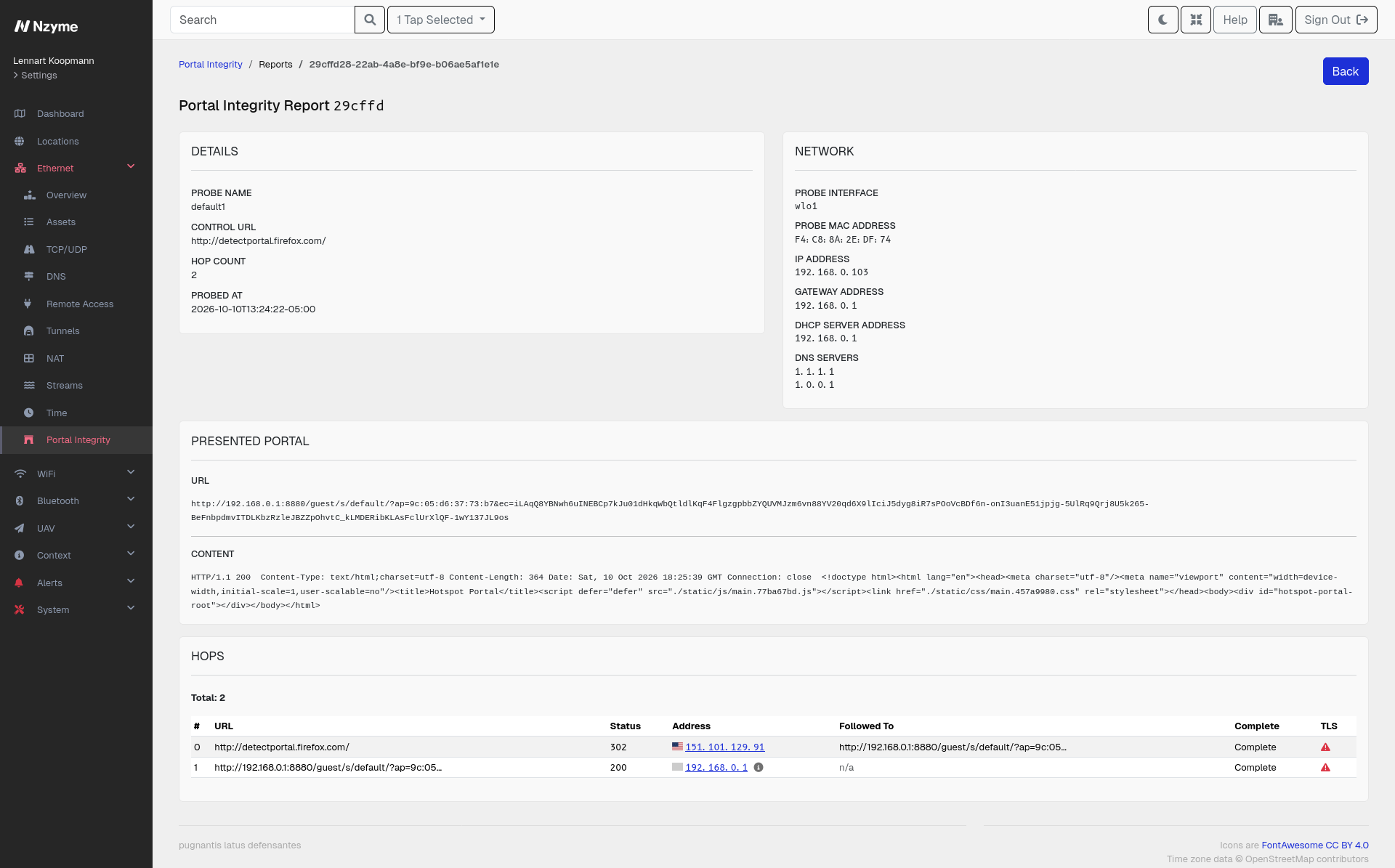
You can read more about how this works and how to set it up in the portal integrity documentation.
New Feature: STUN/TURN Support
STUN, ICE and TURN are the protocols that let two devices find a way to talk directly to each other, even when both sit behind NAT routers or firewalls. They are the foundation of almost all real-time communication on the modern internet, like video calls, voice calls, screen sharing and remote-control tools. Because these protocols are specifically designed to punch through NAT and firewalls, the same mechanics can also be used to establish peer-to-peer channels that bypass traditional network controls.
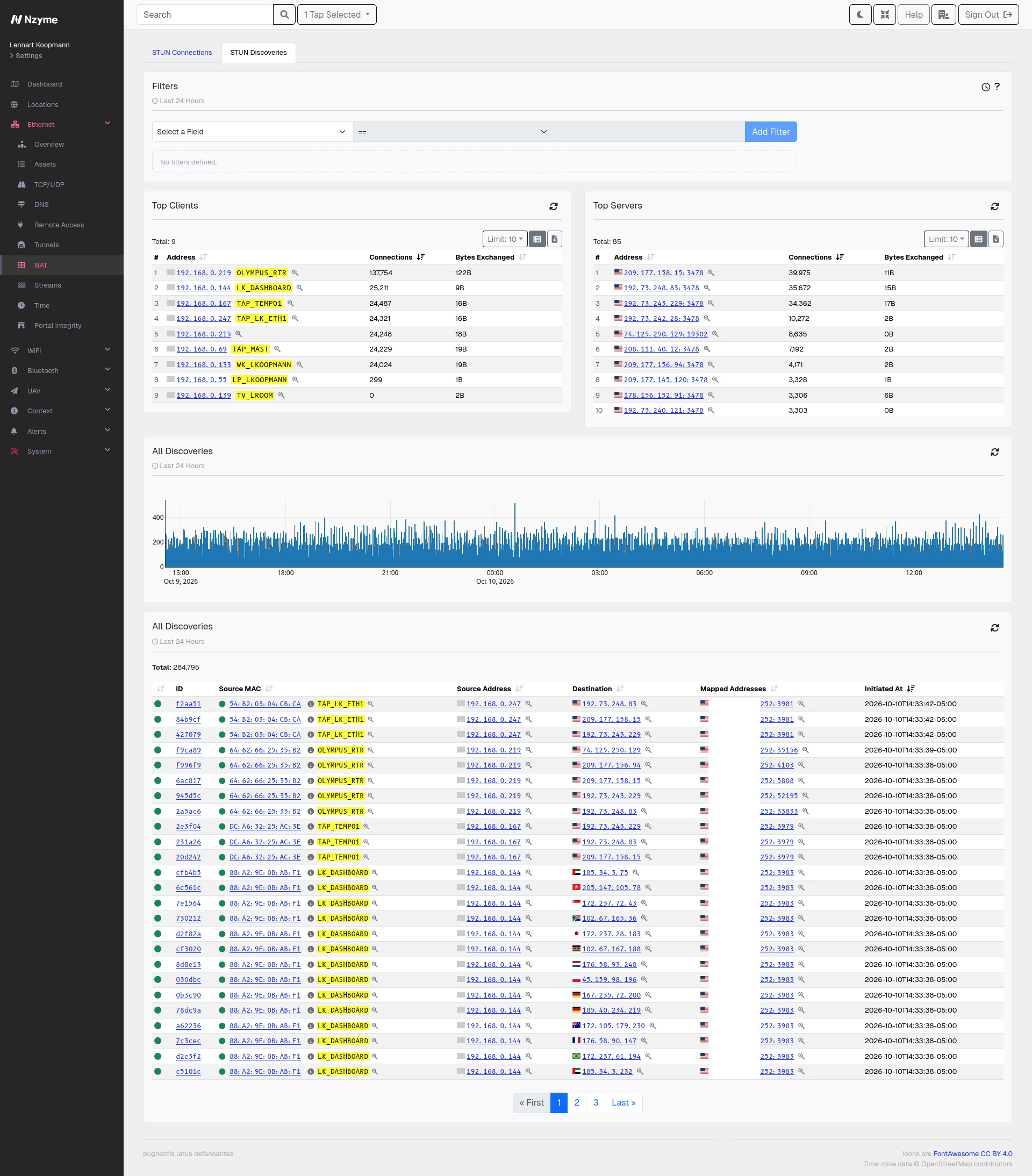
Nzyme now observes this activity passively and presents it in two views under the new NAT section of the Ethernet subsystem:
- NAT Discoveries show devices asking a public STUN server what their public address looks like. This is normal and common, but it is useful to see which devices are doing it, how often and to which servers.
- STUN Connections show two devices negotiating a direct path to each other. TURN relay activity is folded into this view and flagged with a TURN indicator, because a relay hides the real remote peer behind the address of the relay.
Both views come with charts of active connections, top sources and top destinations, as well as filtering, sorting, pagination and details pages. Connections that carry encapsulated protocols like WebRTC are linked to the respective sessions.
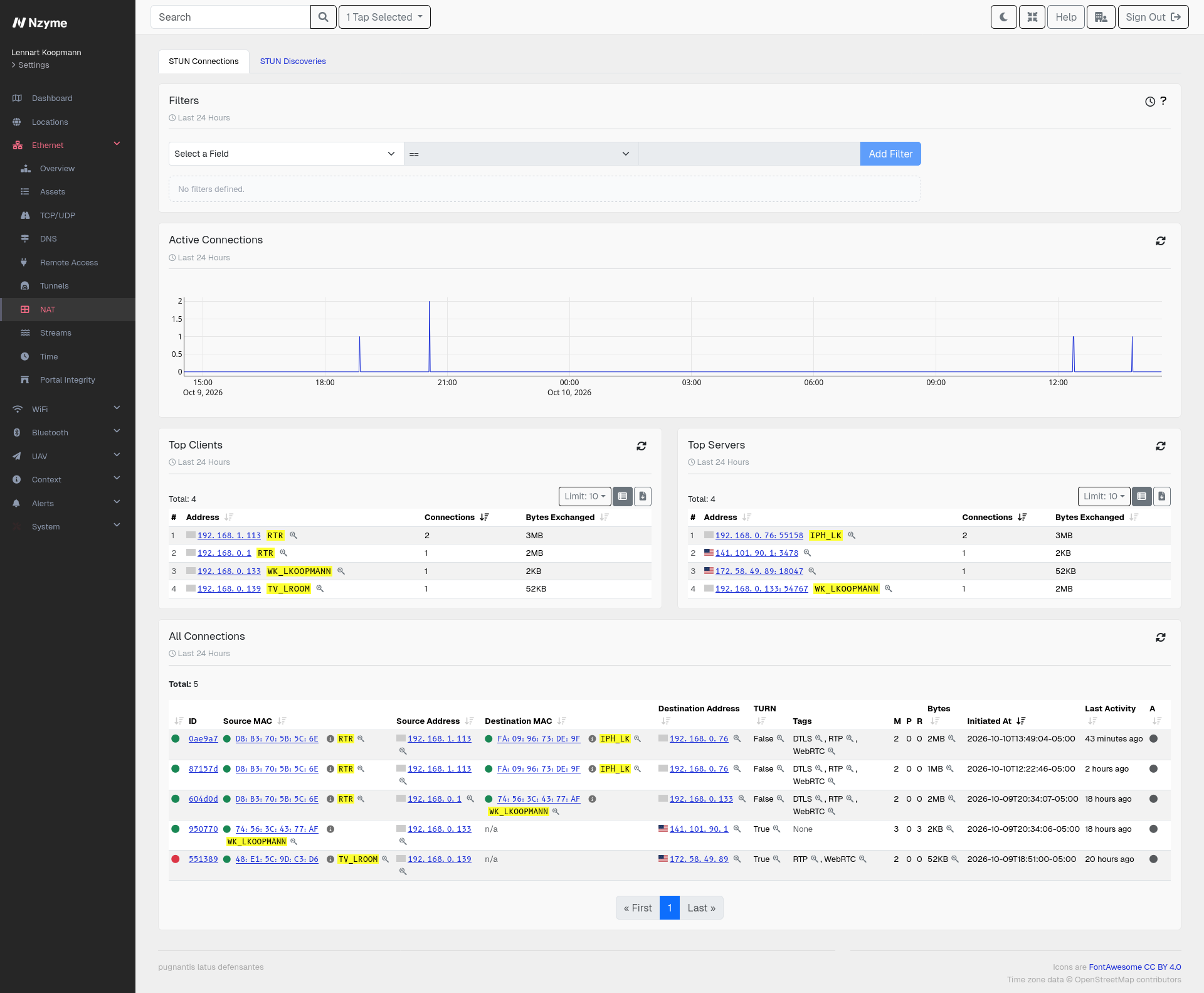
Read more in the STUN, ICE and TURN documentation.
New Feature: WebRTC Support
WebRTC is the technology behind most in-browser and app-based real-time communication. Nzyme uses the STUN/ICE negotiation described above to recognize a WebRTC connection and then inspects the traffic on that connection to determine what it is carrying. A connection that shows STUN/ICE plus RTP media or a DTLS data channel is recognized as a WebRTC session.
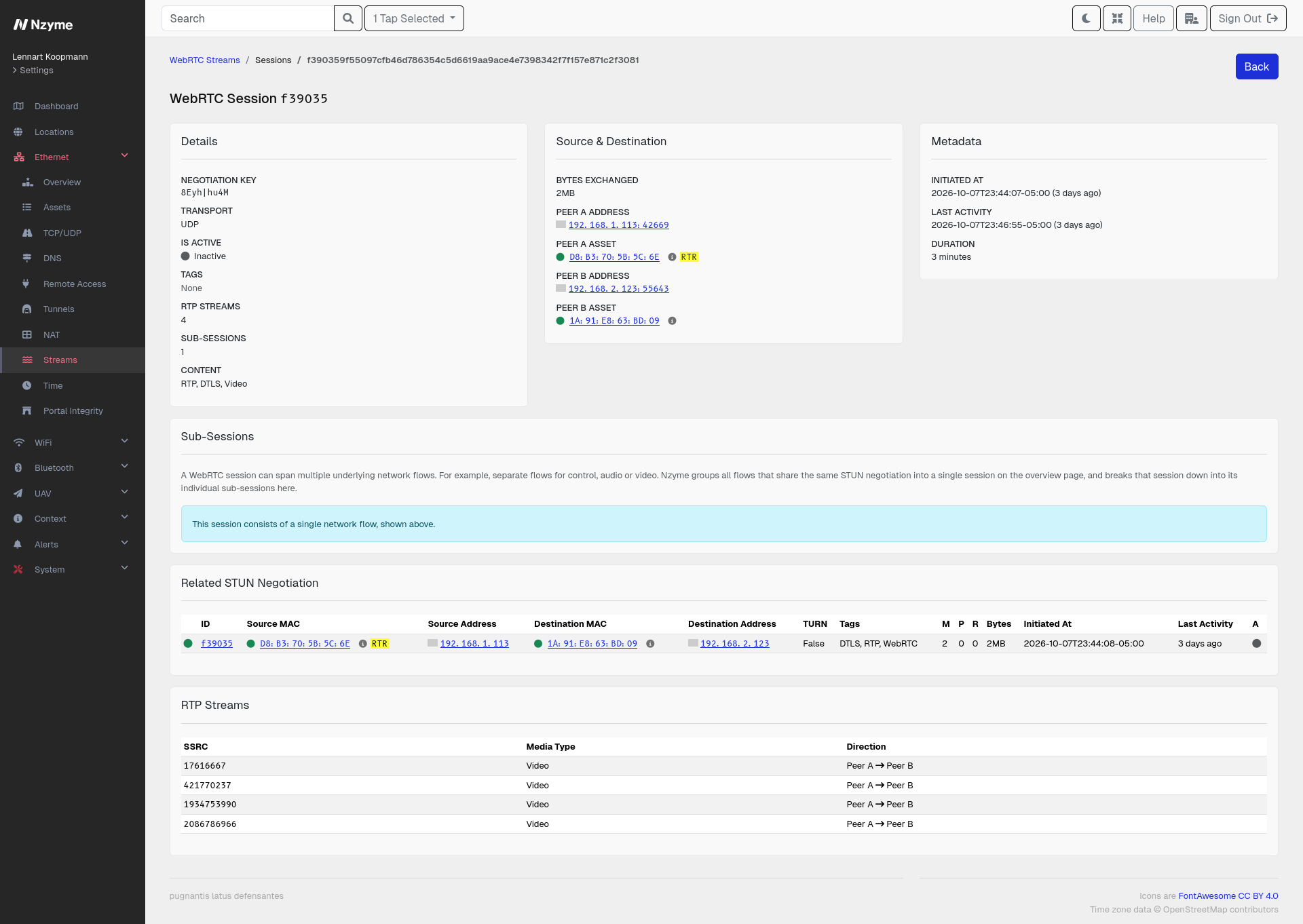
Not all WebRTC is a video call. The new WebRTC page under Streams shows, per session, whether it carries RTP media or a DTLS data channel, and whether the media is suspected to be audio or video. Each media stream is listed with its direction and packet counts. Sessions with a data channel but no media can be more interesting than a plain video call when investigating where data is going, because a data channel can move arbitrary and opaque data.
Nzyme summarizes all underlying network flows of a session into a single row and can break them back down on the details page. The page includes an activity chart of concurrently active sessions and a ranking of the peer pairs exchanging the most data, together with filters and sorting.
Read more in the WebRTC documentation.
New Feature: RTSP Support
RTSP is the protocol most IP cameras, network video recorders and streaming appliances use to set up and control live audio and video streams. These are exactly the kinds of devices that are often deployed with weak or missing authentication. RTSP negotiations happen in clear text, so Nzyme can observe them passively and surface what is being streamed, from where, to whom, and how well it is protected.
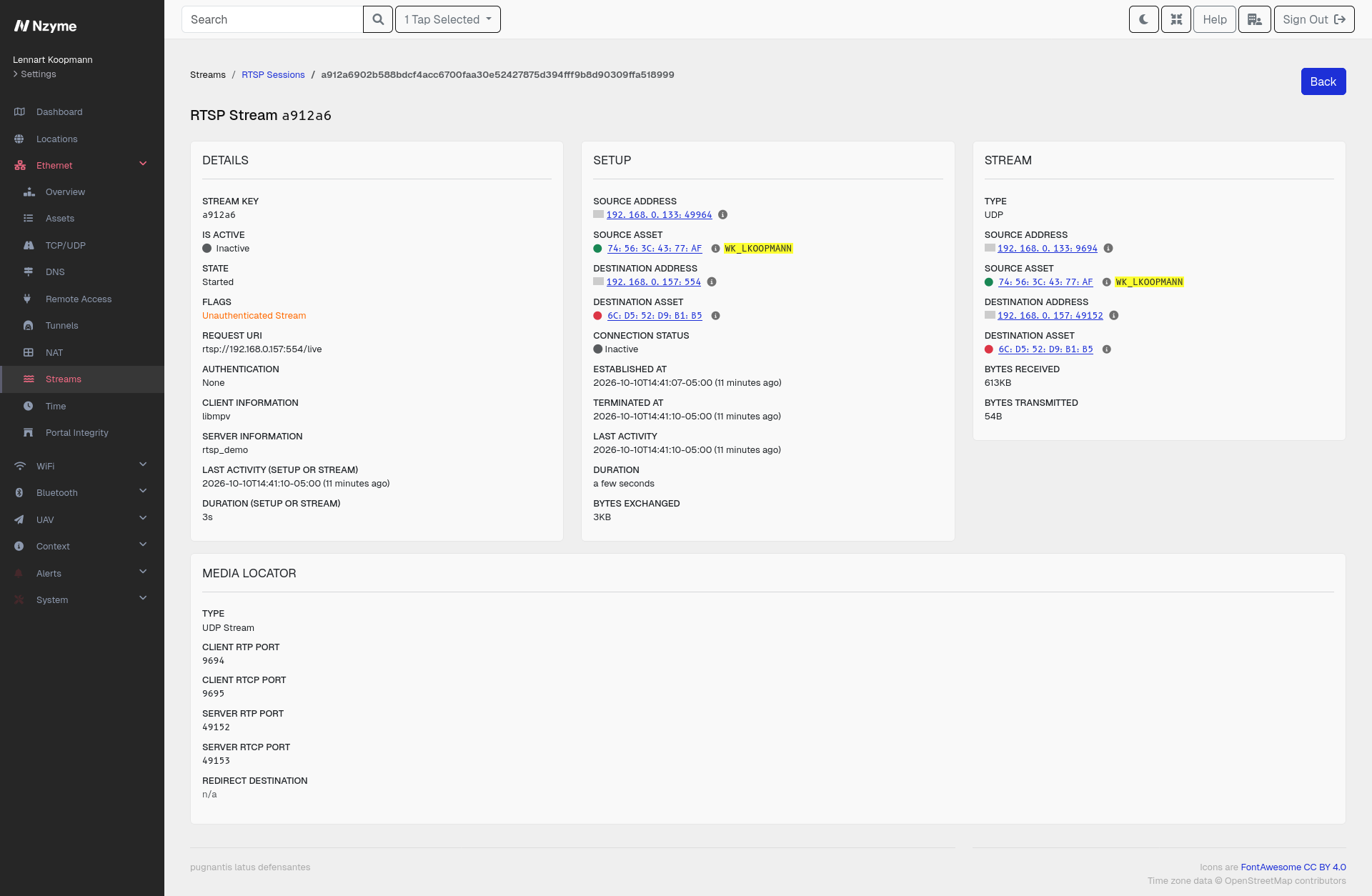
The new RTSP page under Streams lists each stream with its client and server, the requested stream URI, the client software and camera identity, the negotiation state, the media description parsed from the SDP, and how the media is transported. Nzyme links the media flow back to the control connection, so you see them as one stream, even if the media travels over a separate UDP flow or is interleaved into the TCP control connection.
A camera feed should only ever be pulled by the systems you expect, like your network video recorder or a security dashboard. Because Nzyme records the client of every stream, you can filter the RTSP page by camera and immediately see every device that is or was watching it. A workstation, a phone or an unknown device showing up as a client of a camera is a finding worth looking into, and a stream being pulled from outside your network even more so. The authentication posture of each stream, classified as unauthenticated, Basic, Digest or unknown, tells you how easy it would be for such a client to get access in the first place.
Charts show the number of active streams as well as top servers and top clients. RTSP setup data is also shown on the details page of the underlying TCP session.
Read more in the RTSP documentation.
New Feature: API Keys and REST API Documentation
The web interface of Nzyme has always been driven by a REST API, but it was not documented and there was no way to use it without an interactive login. We added both of these things in this release.
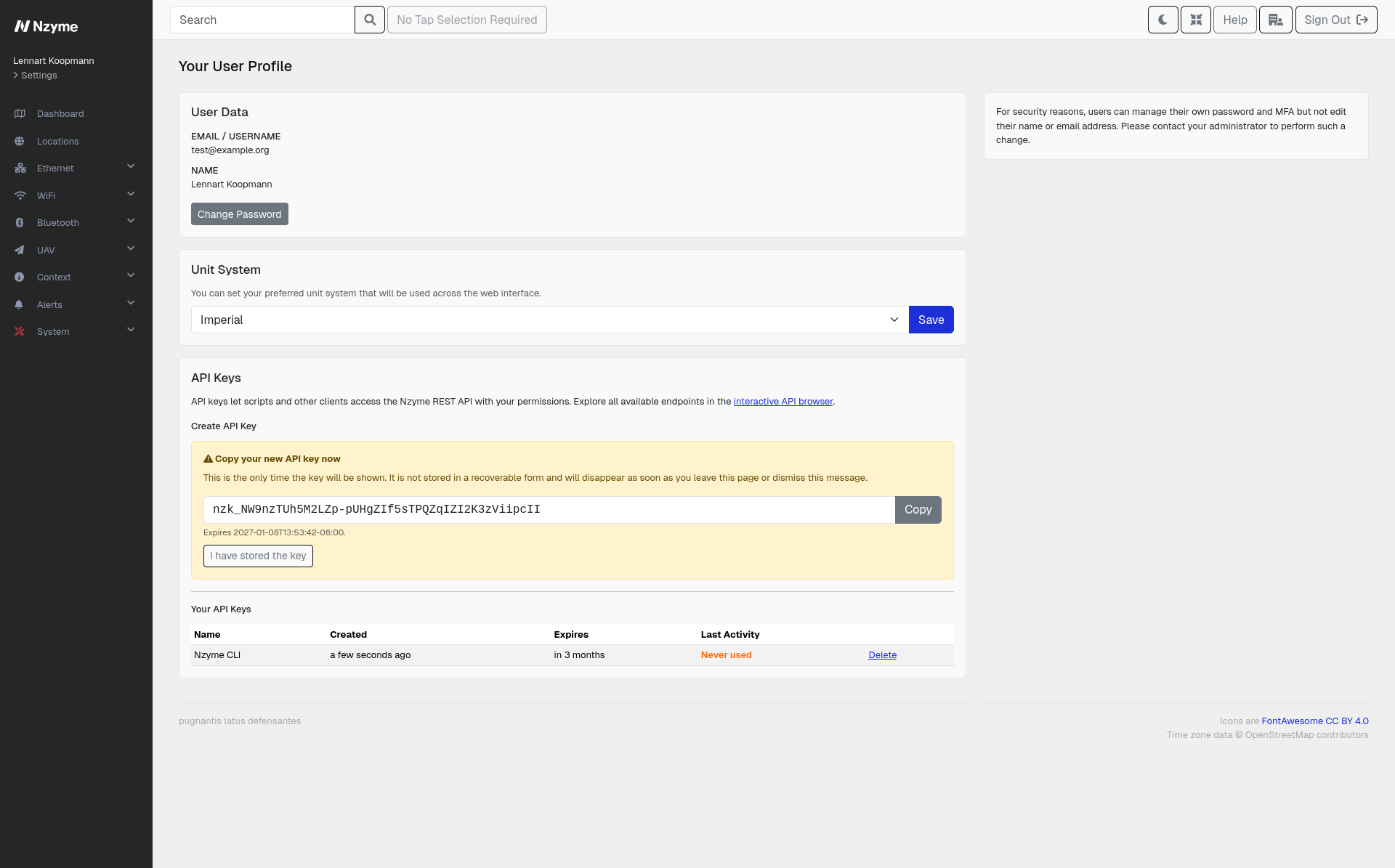
Every user can now create API keys on their profile page. A key always belongs to a single user and inherits the permissions of that user. The list of keys shows the last activity of each key, so you can easily spot keys that are no longer in use. Organization and super administrators can review the keys of all users within their scope, and Nzyme records a system event every time a key is created.
A few sensitive endpoints, like changing passwords, resetting MFA and managing API keys, can only be used with an interactive session and reject API keys. A leaked key can therefore not be used to create new keys or to lock the user out of their account.
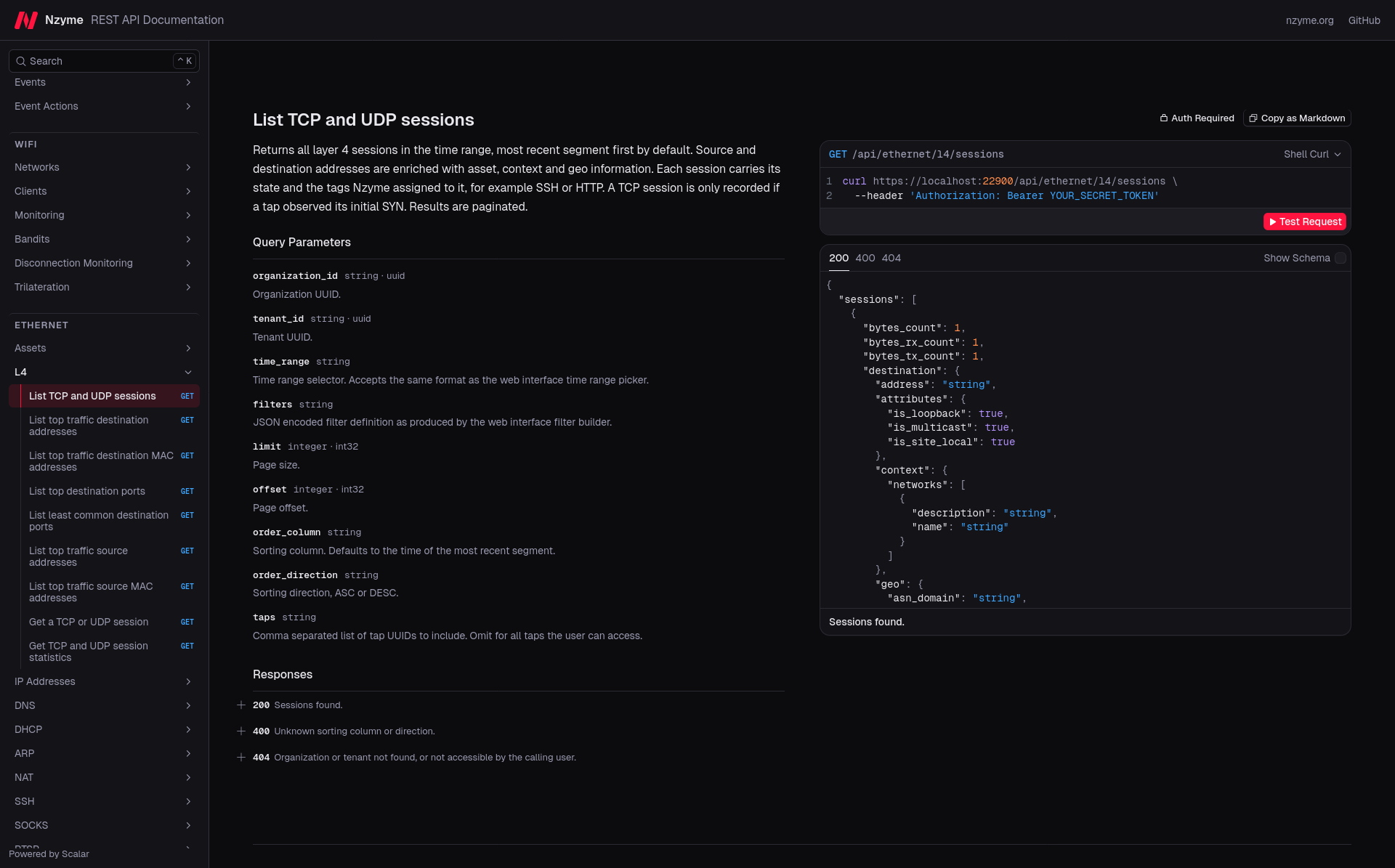
The complete REST API is now documented in an interactive API browser at api.docs.nzyme.org. You can select your release, enter the address of your own Nzyme node together with an API key, and try every endpoint directly from the page.
New Feature: Network Context
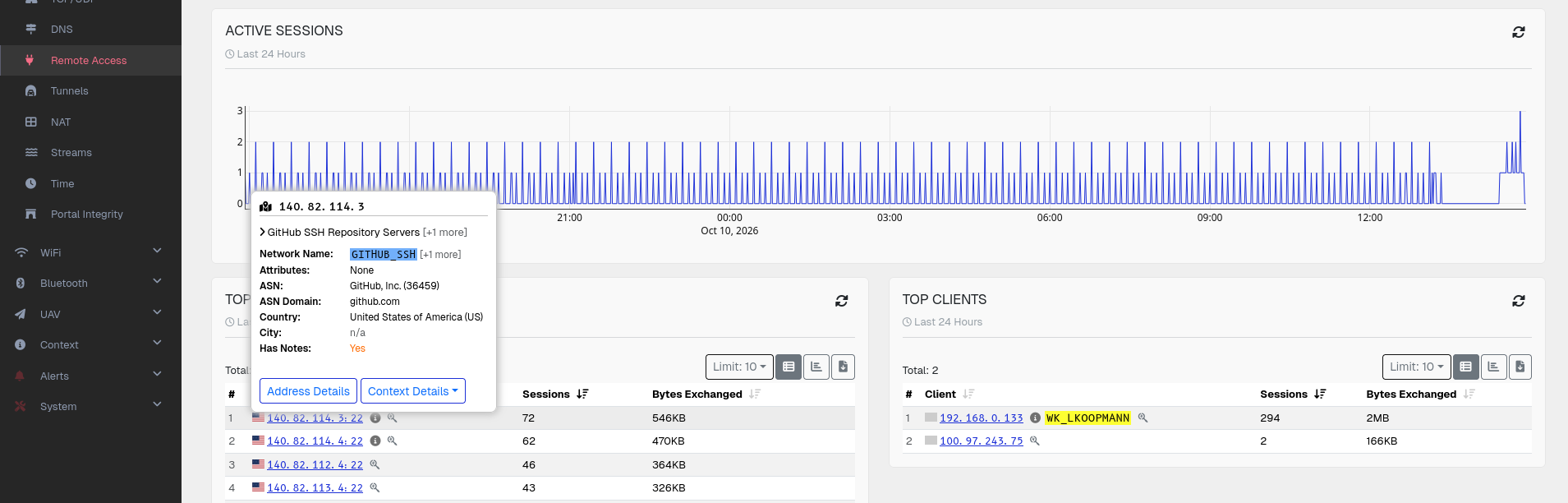
Context in Nzyme was previously limited to MAC addresses. You can now also attach a name, description and notes to a network, specified in CIDR notation. Network context applies to every IP address inside that network, which makes it useful for describing things like location and other business or technical metadata.
Typical uses are labeling your internal segments like user VLANs, guest WiFi, server networks, management networks or IoT segments, labeling external address space you interact with regularly, marking sensitive or regulated segments so traffic to and from them stands out, and documenting ownership and escalation paths for a segment.
Both IPv4 and IPv6 are supported, overlapping networks with different prefix lengths are allowed, and the creation form shows the first and last address of the range as you type. The context is displayed next to IP addresses across the entire Ethernet subsystem, and IP addresses are also shown with the name of their associated asset wherever possible.
Read more in the context documentation.
New Feature: IP Address Details Page
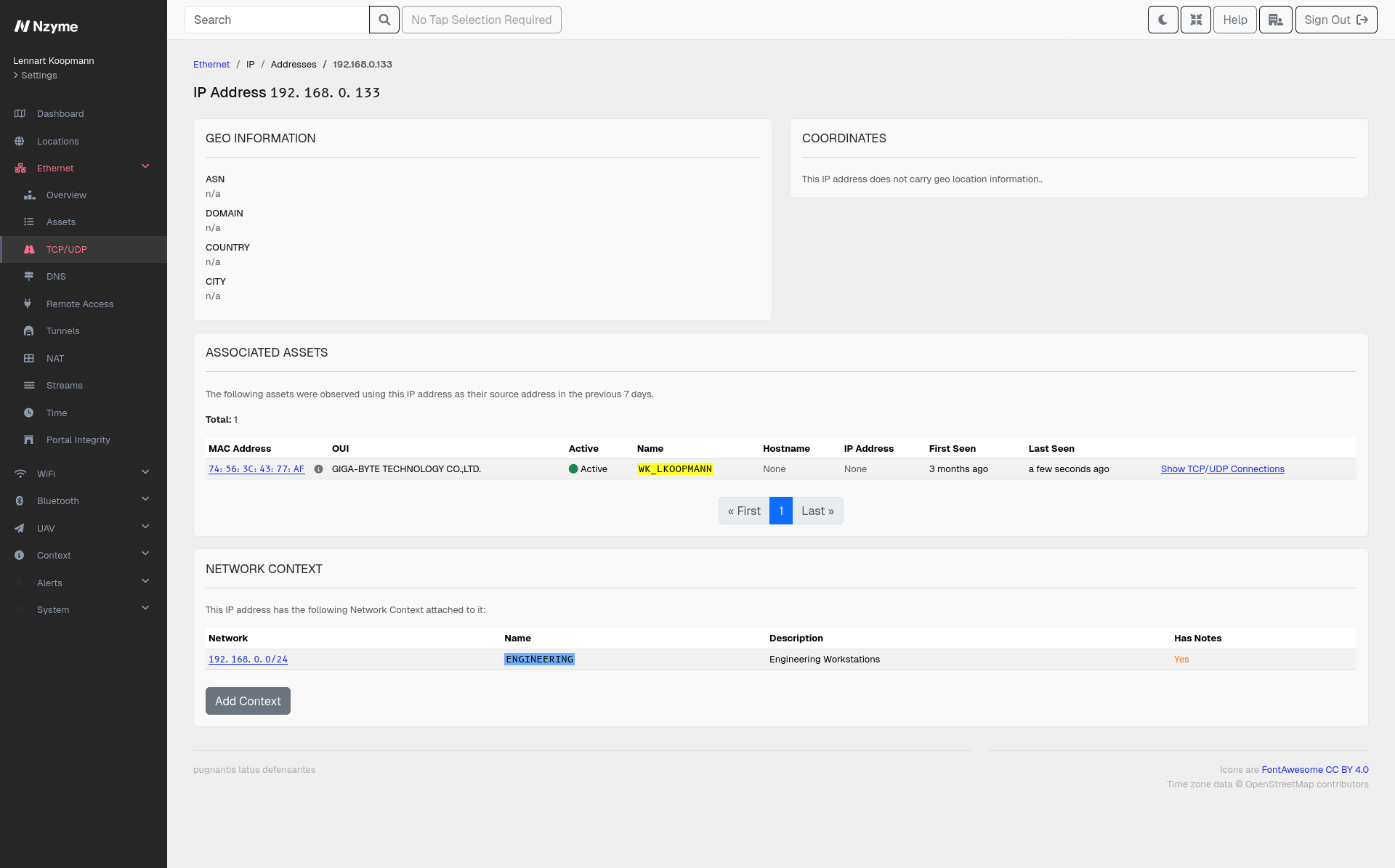
Every IP address in the Ethernet subsystem now links to a dedicated details page. The page shows all assets that were observed using the address, the associated GeoIP and ASN information, any configured network context, and links into the filtered session data for the address.
New Feature: Tap top Process Monitor in nzyme-util
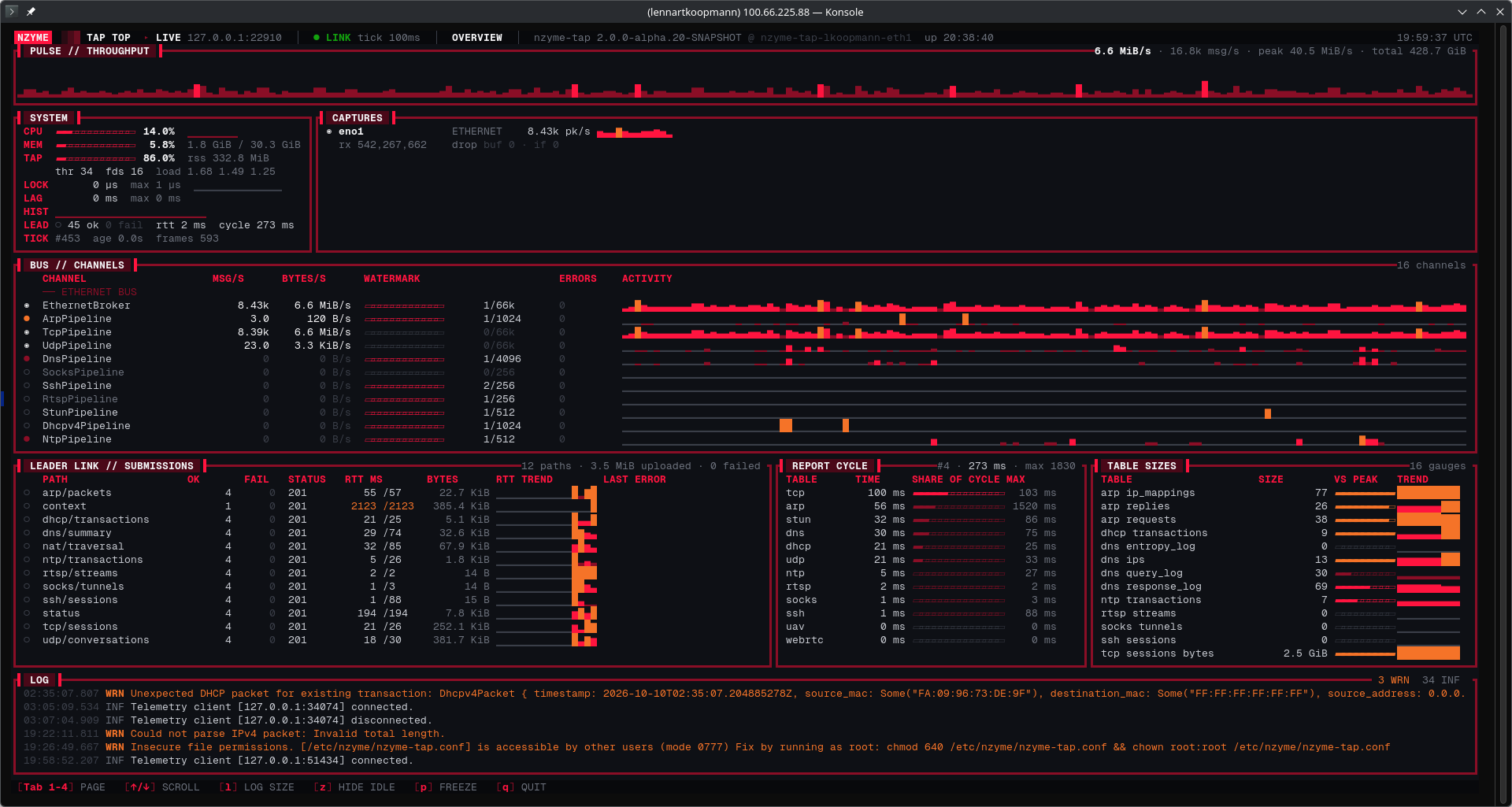
Taps process a lot of data, and it has been hard to see what is going on inside of a running tap without reading log
files or metrics in the web interface. The new nzyme-util tap top command opens a live terminal dashboard of a
running tap, similar to the classic top command. It shows throughput, capture statistics per interface, the WiFi
channel hopper, bus channels, table sizes, timers, leader link submissions and system information, all updated in
real time.
The tap exposes this data through a new telemetry module that is disabled by default and listens on localhost only
when enabled. You can also record a session to a file and replay it later at any speed, which makes it easy to share
what a tap was doing with us when you need help debugging a problem.
New Feature: Web Interface Narrow Screen Mode
Nzyme shows a lot of information in tables, and on laptop screens or smaller windows this can get crowded. The web interface now has a narrow mode, which can be toggled from the navigation bar. In narrow mode, inline information like context and asset names, as well as some entire columns, are hidden to keep tables readable. The setting is remembered in your browser.
Improvement: Bluetooth Filters, Sorting, Context, Charts and Monitors
The Bluetooth subsystem has caught up with the rest of the product. All Bluetooth tables can now be filtered and sorted, including new string filter types for substring matches, lengths and unset values. Context for MAC addresses is shown everywhere, and you can set a name and context for a device directly from its details page.
New charts show the number of observed devices over time as well as histograms of manufacturers and device types, and all histograms can be sorted and used for filtering. Bluetooth now also supports monitors, so you can save any filter set as a custom detection. The Bluetooth subsystem is enabled by default again.
Improvement: Tenant and Tap Selector
Nzyme no longer asks you to select a tenant after login if there is only one tenant you can act as. Your tap selection is now also remembered across logins instead of being reset each time. The global tenant selector respects the dark theme.
Improvement: Additional Asset Filters
Assets can now be filtered by additional attributes like IP address or hostname. Asset tables and histograms have filter links, and the ARP tables gained filter links and sorting as well.
Improvement: Time Range Chart Behavior
Charts with a relative time range now always end at the current time. Selecting a time range from a chart now also updates the URL, so you can share exactly what you are looking at. Filters can be selected directly from dropdowns.
Improvement: Charts for SSH and SOCKS Pages
The SSH and SOCKS pages now have charts, in line with the other protocol pages of the Ethernet subsystem.
Improvement: Detection of Source/Destination Traffic Direction for TCP and UDP
Nzyme previously used port numbers to guess which side of a TCP or UDP session was the client and which was the server. The tap now determines the direction from the observed connection flow. For TCP, the side sending the opening SYN is by definition the client. For UDP, the first observed datagram orients the conversation, and protocol taggers like STUN can re-orient a conversation when they learn more about it. This makes source and destination information across all Ethernet pages significantly more reliable.
Improvement: Significant Performance Improvements for nzyme-tap and nzyme-node
nzyme-node now uses a database connection pool. The pool size defaults to 20 connections and can be configured in
the node configuration file. The node details page shows pool usage over time. The session queries behind the L4
pages have been optimized with new database indexes.
On the tap, CPU sampling has been moved out of the leader link locks and table tasks are no longer executed when no interfaces are present.
Download & Upgrading
All packages are available for download on the downloads page. Upgrading is easy, and we have documentation as well as release notes on the download page.
New installations should follow the installation documentation.
How can I help?
You are some of the first users to try out Nzyme v2.0.0, and we are looking for any kind of feedback:
- What didn’t work, what bugs did you experience?
- What was confusing or seemingly unnecessarily complex?
- What is missing?
- What do you think should be changed?
Again, this is an early release and no feelings will be hurt.
You can file issues on GitHub, join the nzyme Discord or post in the discussion forums to provide your feedback or ask questions.