Platform Capabilities

Enterprise-ready foundations for running Nzyme securely at any scale.

Locations

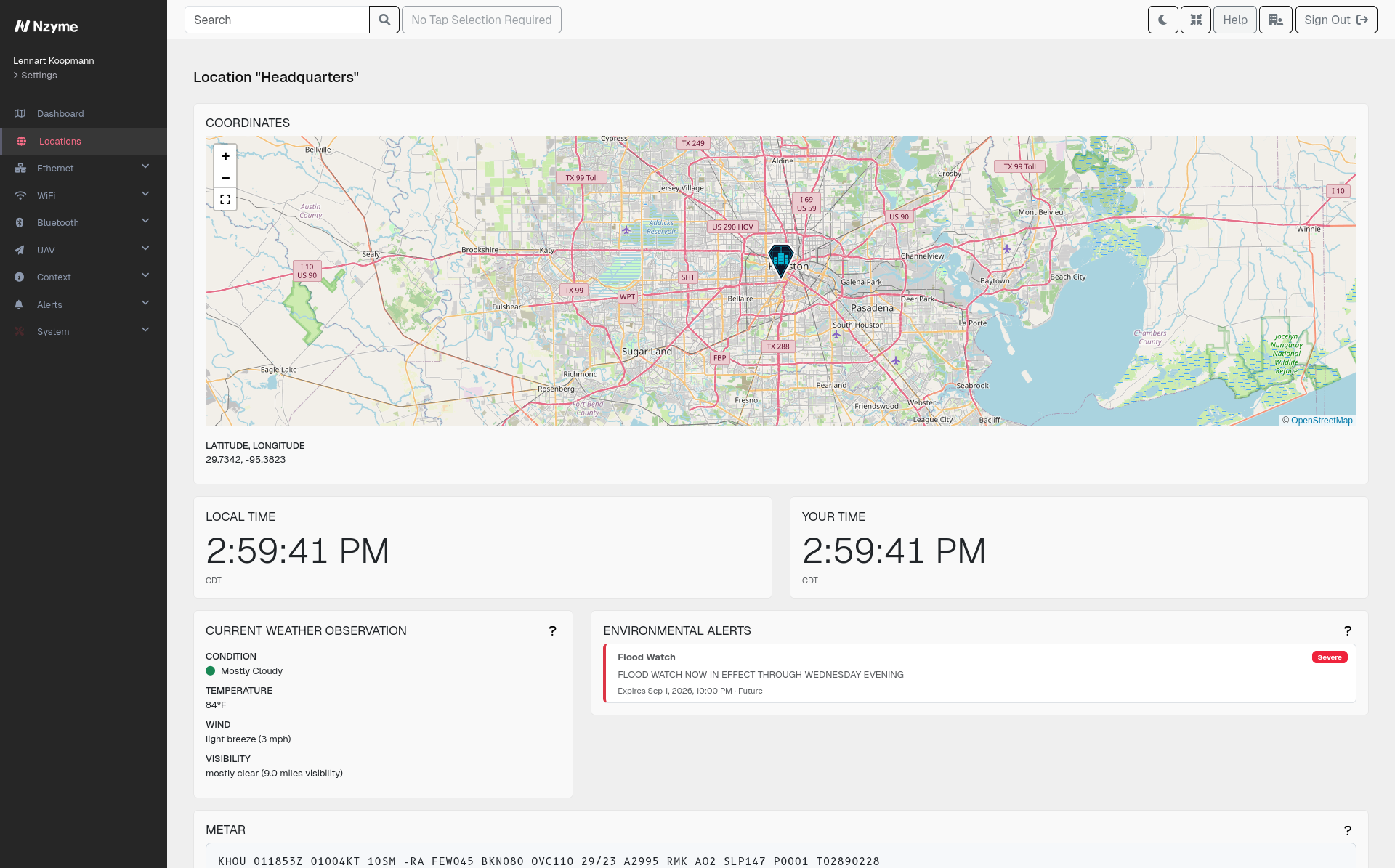
Locations are useful for organization and for alert context, as an alert can mean something different depending on where it is fired. A single dashboard of alerts becomes harder to analyze once you are running a complex environment: a campus, a chain of retail stores, or a portfolio of client sites.

  • Floors and floor plans. Upload a floor plan and place taps on it so you can see exactly where in a building a sensor sits.
  • Positioned in the world. A location can also carry its own latitude and longitude if you have an outdoor site or need tracking at the level of a city or campus.
  • Alerts grouped by location. Detection alerts are grouped by location, so you can determine the security state of each site.
  • Environmental context, not just network context. Locations pull in weather and storm warnings from Nzyme Connect. Ground conditions can affect sensors, like a sensor going offline or interference to a link.

This is the foundation for location-aware detection. As it grows, Nzyme will use where an alert happened, not just what happened, to improve detection quality.
Certificate Management

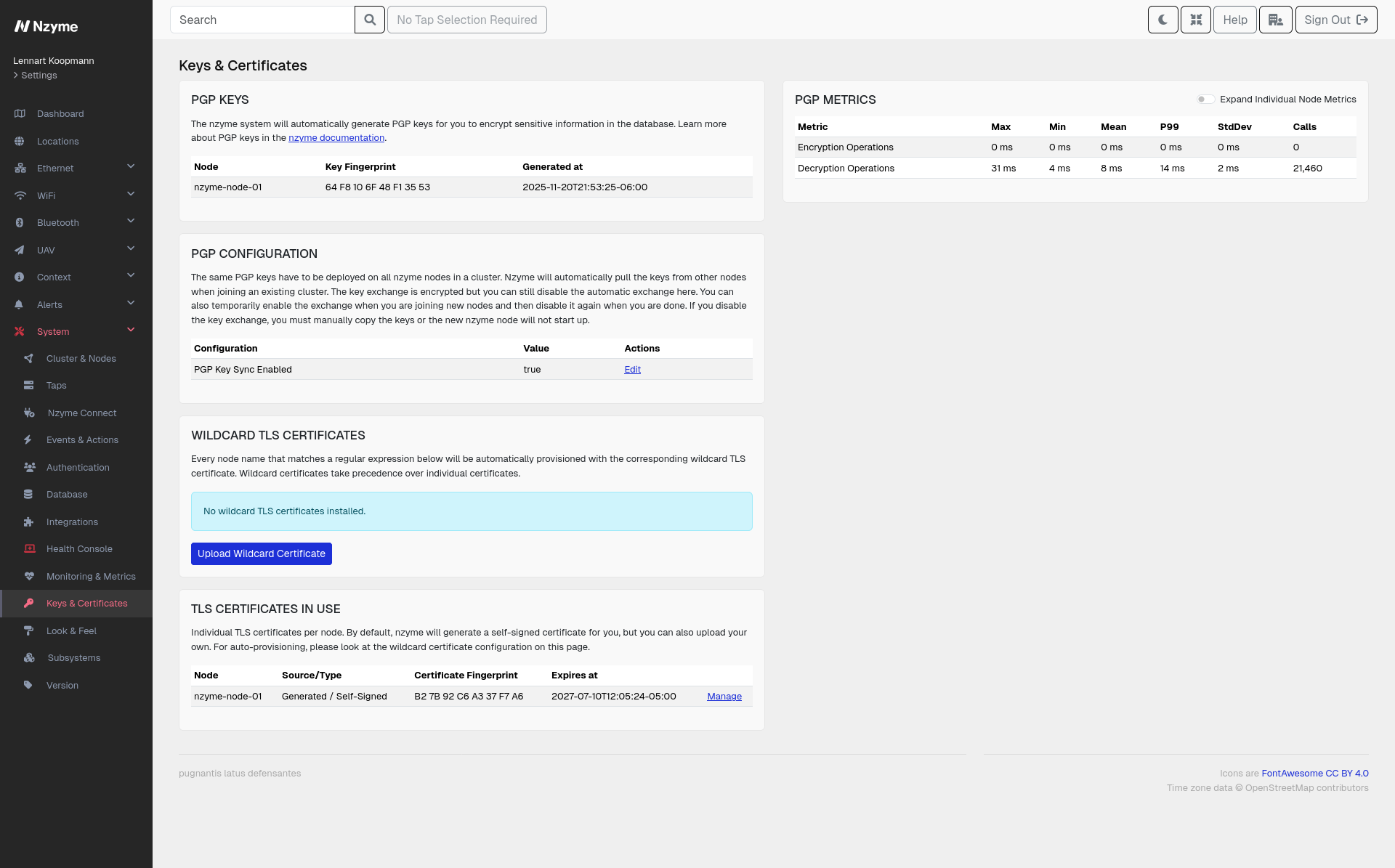
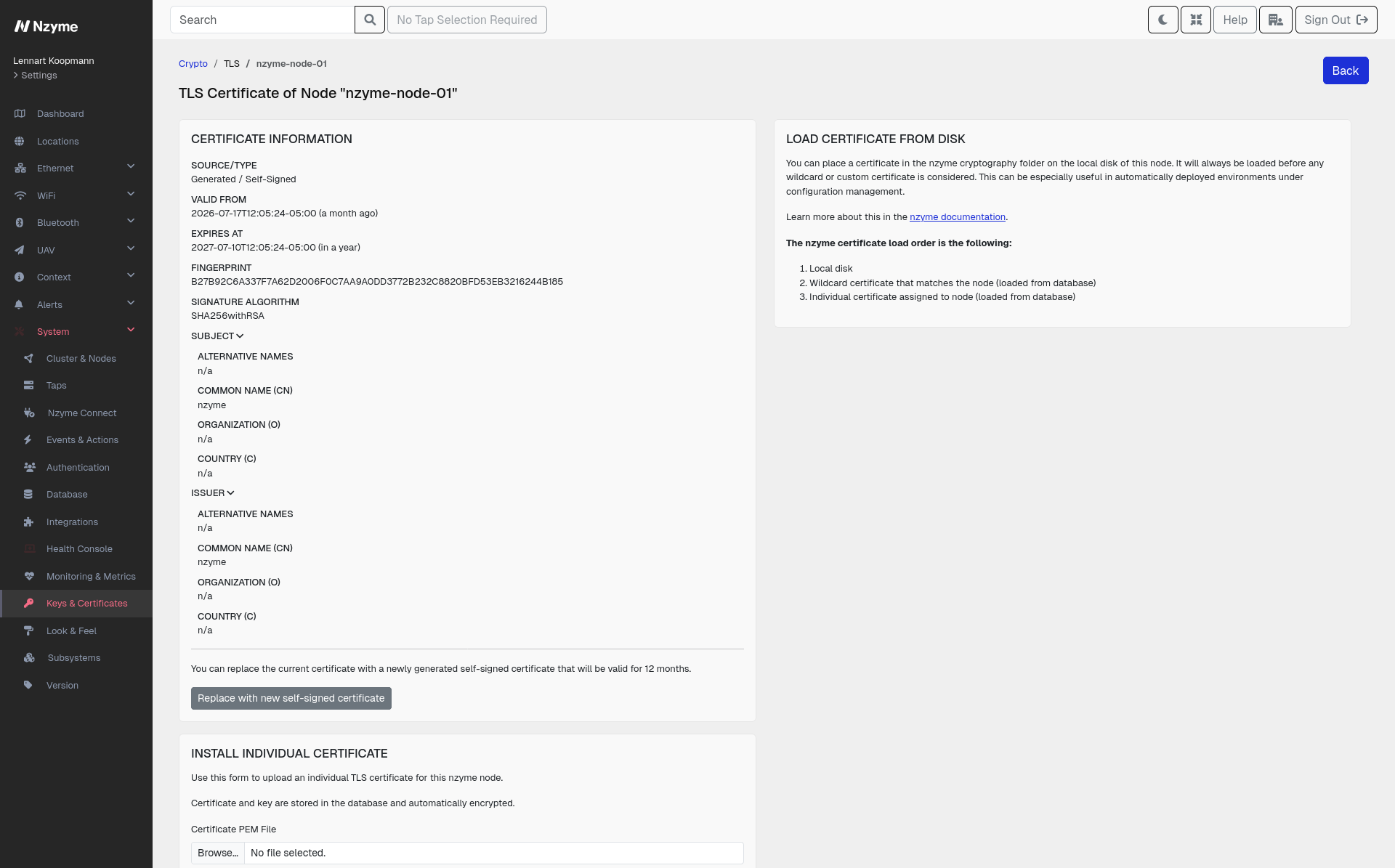
Setting up TLS and PGP is usually a hassle. The complexity comes from needing a sequence of command-line prompts, files in a specific format, and a complete chain when deployed. Instead of this, Nzyme handles keys and certificates in the web interface and can generate what it needs on its own.

  • Encrypted from the first start. Nzyme generates certificates automatically, so a new installation is protected immediately.
  • No option to turn TLS off. The web interface and APIs are always encrypted.
  • Bring your own keys or generate them here. Upload the keys and certificates you already have through the web interface or the API, or have Nzyme generate self-signed certificates for you in the interface.
  • No format wrangling. Nzyme converts what you provide into the format required.
  • Supports encryption elsewhere in the platform. The same key material underpins Encryption-at-Rest.

Actions

Actions fire whenever a detection is raised or a system event occurs, sending an email, a syslog message, or a webhook.

  • Two sources, one delivery path. Detections cover what Nzyme finds in your networks, from a rogue access point to a monitor crossing its threshold. System events cover the platform. Both route through actions.
  • Subscription model. An action can be subscribed to any combination of detections and system events. You can use the same webhook for an evil twin alert and a certificate about to expire, or you can split them to different destinations.
  • Three delivery types. Send an email, forward a syslog message to your logging infrastructure, or execute a webhook to trigger something else.
  • Scoped like everything else. Actions are integrated with the user permission and multi-tenancy model, so who can create or subscribe an action follows the same organization and tenant boundaries as the rest of Nzyme.

System Events

System events are what Nzyme reports about itself, as opposed to what it reports about your networks. It covers both: the things that break and the changes people make to it.

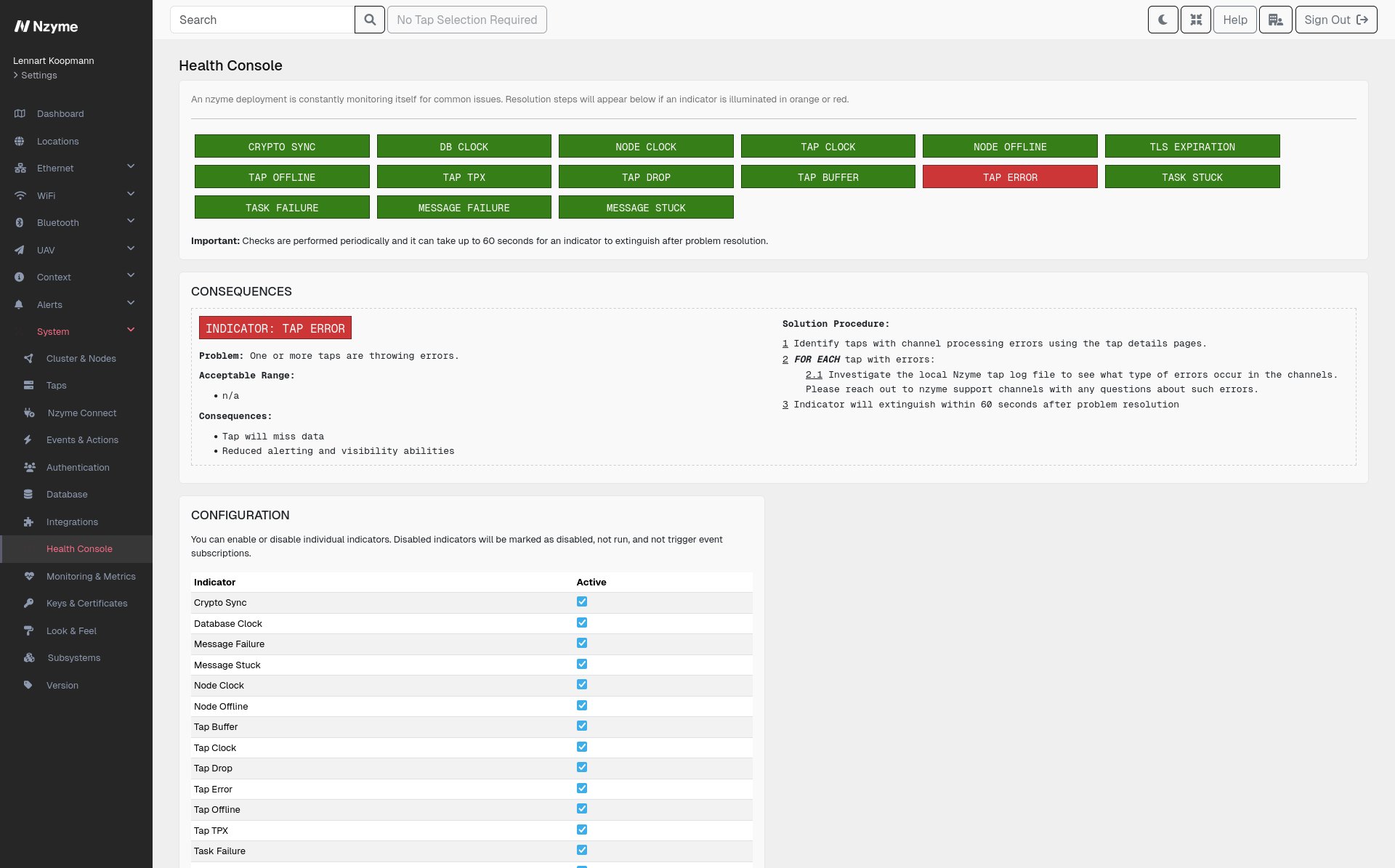
  • Health findings. The Health Monitor raises an event whenever it finds a failure or misconfiguration, from a sensor that stopped processing data to a certificate about to expire.
  • Administrative and security events. A super administrator being created, MFA being reset for a user, and similar changes to the platform itself each produce an event.

You subscribe Actions to the events you care about, and Nzyme delivers them by email, syslog, or webhook.

Encryption-at-Rest

Nzyme holds credentials for the systems it connects to. These credentials are stored strongly encrypted using PGP, so any copy of the data or a stolen disk does not easily expose this information.

Encryption happens transparently across the entire Nzyme cluster. Every node can use the values it needs without anyone distributing secrets by hand, supported by Certificate Management, which handles the key material behind it.

Health Monitor

Nzyme continuously checks itself for failure scenarios and misconfigurations. When something is not right, you hear about it from Nzyme, usually before it turns into a real problem.

Examples of what it catches:

  • Clocks out of sync between the database, a node, or a sensor
  • A sensor throwing errors or no longer processing data
  • The TLS certificate for the web interface approaching expiration

Findings are raised as system events, which means they can be routed through Actions to reach you wherever you want to be alerted.

MFA

Multi-factor authentication is built into the platform and enabled for every user. There is nothing to license or integrate, and no external service is involved, so it works the same in an isolated deployment as it does anywhere else.

MFA can be disabled for individual users where it does not fit.

Nzyme is security operations infrastructure, and that makes access to it valuable to an attacker. It holds a detailed picture of your networks, the devices on them, and how they communicate, which is exactly the reconnaissance someone would otherwise have to work for. It is also the system your team uses during and after an incident, when knowing what happened depends on the data being intact and the platform being available. An attacker who reaches a Nzyme account can learn what you know, and interfere with your ability to respond.

Subsystem Management

Nzyme is built from subsystems like WiFi, Ethernet, and Bluetooth, and each one can be turned off where it does not apply. A tenant that only monitors WiFi never sees an Ethernet menu or Ethernet data.

  • Scoped to organization and tenant. Enable or disable a subsystem for the entire cluster, a single organization, or a single tenant, matching the deployment scope.
  • Hidden instead of disabled. For a cleaner user experience, a disabled subsystem disappears from the web interface instead of being greyed out.
  • Closed off at the API too. Disabling a subsystem rejects its data ingestion and API paths, so taps cannot send data for something that is turned off.

REST API

Anything you can do in the Nzyme web interface, you can also do by calling the API directly. In fact, the web interface uses the API for all of its functions.

  • Full configuration management. Sensors, monitors, actions, locations, and every other setting can be managed programmatically, making it practical to provision a deployment from infrastructure-as-code.
  • Data access for your own analysis. Pull detections, system events, and the underlying network data into whatever you already use for reporting, alerting, or long-term analysis.
  • Automation and integration. Pull Nzyme’s findings into your own tooling and act on them there, as an alternative or a complement to routing them through Actions.
  • Same permissions, same boundaries. API access follows the same user permissions and multi-tenancy scoping as the web interface, so a token cannot reach data or settings its owner could not otherwise see.
  • Service providers. You can provision and manage organizations, tenants, quotas, and users via the API. Also, integration of your user portal and workflows can be done at the same completeness as the Nzyme user interface.

Optionally Air-Gapped

Some environments cannot reach the internet by design. Classified networks, industrial control systems, and isolated segments in regulated industries are built that way deliberately. A security tool that needs outbound connectivity cannot be deployed there. Nzyme can optionally be deployed fully air-gapped, with the entire product experience intact.

This includes the data and content normally supplied by Nzyme Connect. In an air-gapped deployment it reaches your cluster another way, so the platform can fully operate with all its capabilities.

If you are planning a deployment in an isolated environment, get in touch, and we will walk you through how it works.

Multi-tenancy

One Nzyme deployment can serve many separate groups: the clients of a managed security provider, the sites of a university system, or business units that are not supposed to see each other’s traffic. Nzyme organizes this as organizations containing tenants. A tenant sees its own data and nothing else, with no indication that any other tenant exists on the platform.

  • Three levels of administration. The super admins run the platform. Organization admins manage the tenants. User roles work inside a tenant.
  • Fine-grained permissions. Users are granted specific permissions rather than broad roles, so someone can manage monitored networks without touching system configuration, or read data without changing anything.
  • Data access by sensor. Access can be restricted per sensor, so you can give a site team visibility into their own location without opening the rest of the environment.
  • Enforced resource limits. Quotas cap what each organization and tenant can consume.

Quotas

To manage performance when a platform is shared, someone has to decide the resourcing for each group. Quotas let you assign limits to any organization or tenant, covering things like the number of users, the number of sensors, and the number of certain integrations. The limits are then enforced by the platform.

Quotas are optional and set per organization and tenant. You can leave most of a deployment unrestricted and apply limits selectively: a service provider mapping quotas to what a client is paying for, or an enterprise capping what a business unit can deploy on its own. They work alongside Multi-tenancy.

White Labeling

A tool that looks like a foreign system is a tool people are slower to trust, and for a managed security provider it is also a tool that looks like it is not really theirs. Nzyme lets you replace its default branding with your own. The interface your clients or colleagues use can carry your name, not Nzyme’s.

  • Custom setup name. Replace the default Nzyme name shown throughout the interface with your own.
  • Custom logos. Swap in your own branding wherever Nzyme displays a logo.
  • Custom login page. The first screen anyone sees can match the rest of your branding instead of announcing what is running underneath.